WHIP lets OBS and FFmpeg stream directly into video conferences
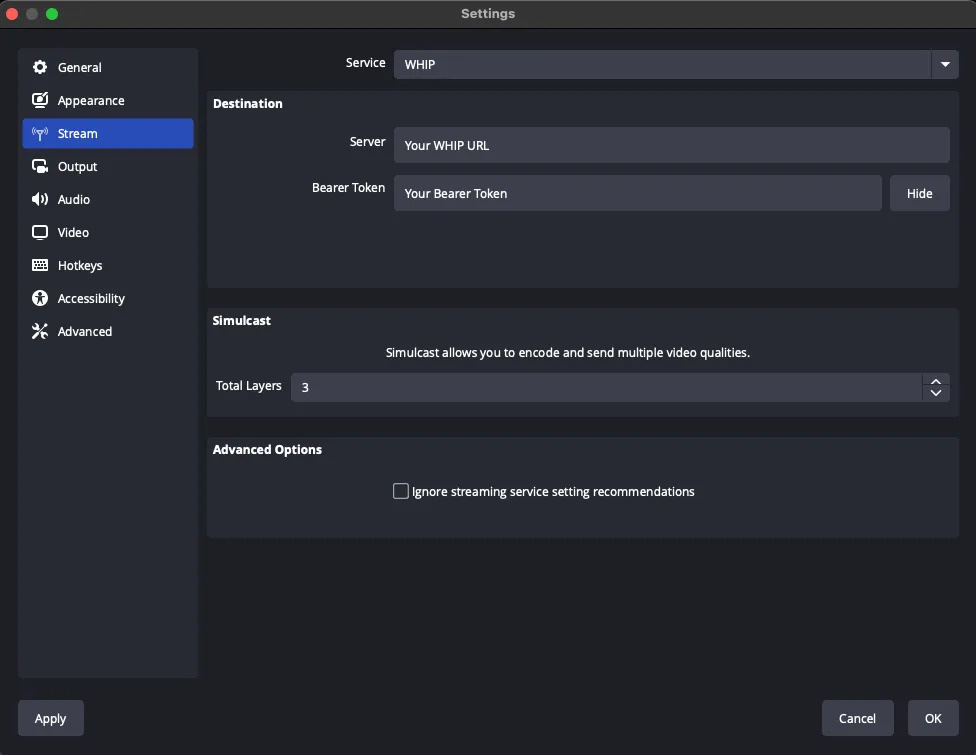
WHIP[1] is an open standard for sending live video to a service using WebRTC[2], and the site argues it fixes blurry screenshares in video conferencing. With WHIP support, tools like OBS and FFmpeg can connect directly to a video conference: you configure everything yourself and control exactly the quality you get. A provider hands you a server URL and a stream key, called a bearer token[3]. Until now, joining a call required each client to run custom code, which meant FFmpeg and OBS could never join.
Blurry screenshares come from a lack of control: the browser picks a bitrate[4], codec or resolution that does not match what you need. OBS and FFmpeg instead let you choose resolution, frame rate, bitrate and codec, and tune those settings for the content you are sharing and for your hardware and connection. OBS Virtual Camera is a partial alternative: it sends the OBS scene to the conferencing app as a webcam, but the conferencing app still handles encoding.
The author works on WHIP in OBS and maintains an up-to-date OBS WHIP setup guide. For providers without WHIP support, the advice is to tell them you want open standards instead of a proprietary client.
Read the original shittyscreenshare.comDiscussion
Sources
-
shittyscreenshare.com
Shitty Screenshare
-
KRGeekNews KO
Shitty Screenshare - 화면 공유 화질을 직접 제어할 수 있도록 WHIP을 지원하자