Supporting the iPhone Duo vertical bar in the FlutterKaigi 2026 app

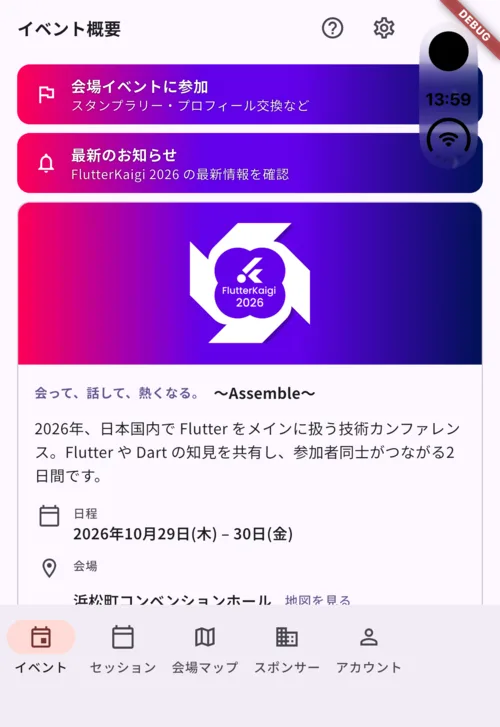
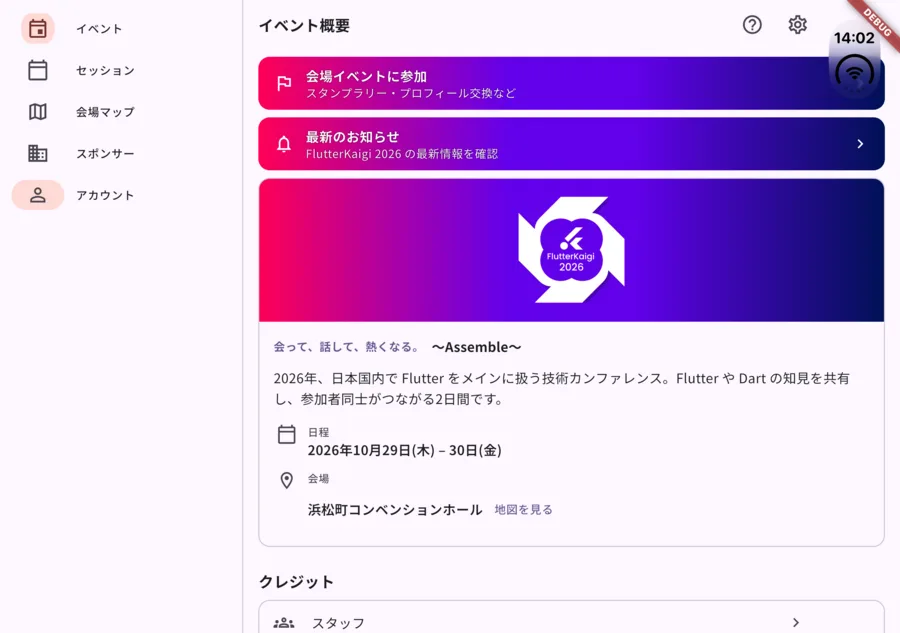
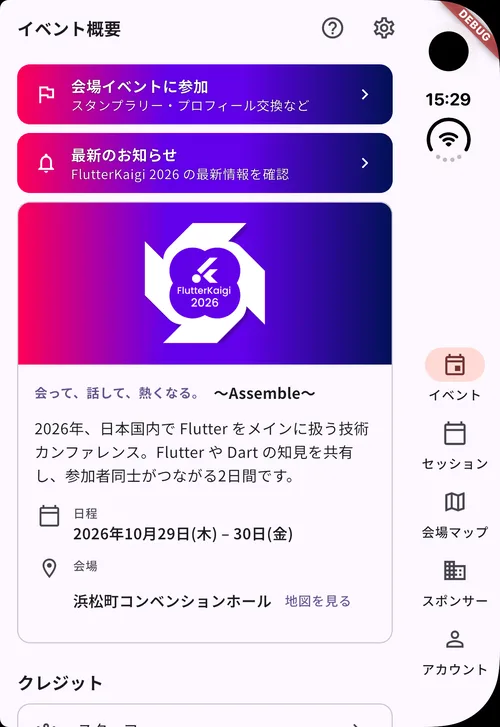
The FlutterKaigi 2026 conference app, developed in Flutter, was updated to support the iPhone Duo's vertical bar[1] — the side strip where iOS stacks the status bar items (camera hole, clock, Wi-Fi) vertically when the device is closed or open sideways. The change was prompted by posts on X about the number of iPhone Duo buyers and by mixi2's Flutter optimization for the device; it landed in pull requests #131 and #132 and was verified with Flutter 3.47.8, Xcode 27.1 and the iPhone Duo simulator on iOS 27.1, not on a real device. Apps built with the iOS 26 SDK run in a compatibility display on the iPhone Duo, so full screen requires a rebuild with the iOS 27.1 SDK; after that, Flutter's self-drawn tab bar stays put while native tab bars move into the strip, and since ListView only avoids the safe area[2] along the scroll direction, content slides under the 84pt-wide bar. In the simulator the bar shows up as a 0pt top inset with an 84pt inset on one side, and it disappears when the device is open in portrait.
The fix drops the bottom tab bar and instead places a bottom-aligned NavigationRail[3] inside the strip, with the body stopping short of the strip and only the background color running to the screen edge. Whether the strip exists is judged from the shape of the safe area, because the strip vanishes in open portrait and swaps sides when the closed device is rotated; conventional iPhones never match the pattern — 62pt at the top in portrait, 62pt on both sides in landscape — and iPads also have a top inset. MediaQuery.removePadding keeps the body's AppBar from avoiding the 84pt a second time, and the outermost widget is a Material rather than a Scaffold so SnackBars stay within the body width instead of covering the tabs; the trade-off is that the tabs hide under the keyboard, like iOS's own tab bar.
Because the safe area returns the same values whether the camera hole sits at the top or the bottom of the strip (right 84, bottom 34), the app fetches occlusion positions with UIView.reservedRegions(kind: .occlusion) over a MethodChannel[4] and refreshes them on metrics changes and on returning to the app, since the iOS 27.1 SDK headers expose no notification or delegate for this. UITraitCollection.verticalBarEdge (Unspecified, Leading, Trailing), found later, was added only as a guard: the width still has to come from the safe area, the value arrives asynchronously, and in Split View the system can report Leading even when the app does not touch the strip. This guard briefly broke layouts when rotating from open landscape to portrait — 130–150ms passed between the Unspecified signal and the screen size change, during which the layout rebuilt without the strip at the landscape size of 951 × 669 — so the switch is now postponed until didChangeMetrics reports a size change or 500ms elapse.
Sources
-
JPZenn JA
Flutter アプリを iPhone Duo の「縦帯」に対応させる