Managing Agent Skills from dotfiles with mise and gh skill
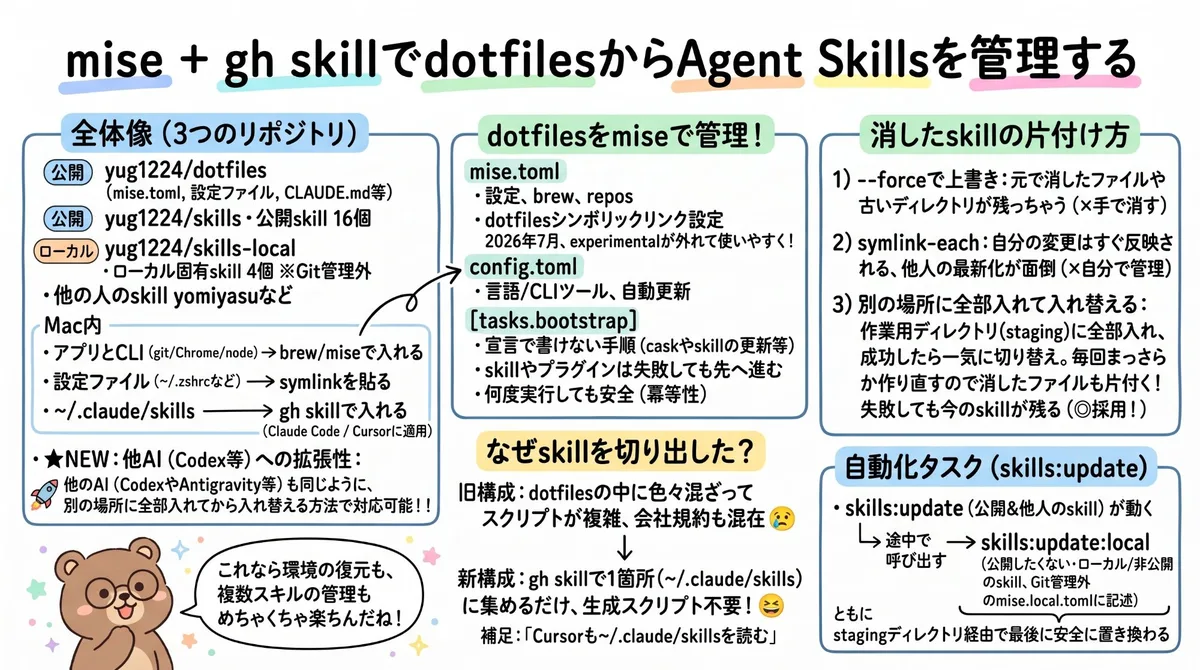
The author, who writes as ぷーじ (@yug1224), manages a Mac development environment with mise[1] and dotfiles[2]. Using mise, the author installs Homebrew packages, language and CLI tools, and config-file symlinks[3]. On a new Mac, one run of make install sets things up, and later reinstalls use make mise.
The Claude Code and Cursor skills (SKILL.md files with instructions that AI loads when needed) had grown inside dotfiles, and a script generated tool-specific files from shared sources. Company-specific rules were mixed into a public repository, and the generation scripts were hard to maintain, so the skills were moved to a separate repository.
There are now three repositories: a public dotfiles repository, a public skills repository with 16 skills, and a local-only skills-local repository with 4 skills. Skills are installed with gh skill[4], a GitHub CLI command that was still in preview at gh 2.104.0 and supports Claude Code, Cursor, Codex, Antigravity and more than 40 other agents. Cursor also reads ~/.claude/skills, so separate generated files are no longer needed. gh skill copies files instead of linking them, so files deleted from the source stayed in the installed location. The author compared three approaches and chose one that installs all skills into a working directory with --dir and replaces ~/.claude/skills only after every install succeeds, so a failed run leaves the current skills in place. The downside is that skills placed by hand in ~/.claude/skills are also removed, so every wanted skill must be listed in mise.toml.
Sources
-
JPZenn JA
mise + gh skill で、dotfiles から Agent Skills を管理する