Heroku Connect configuration pitfalls: sync directions, polling, and field changes
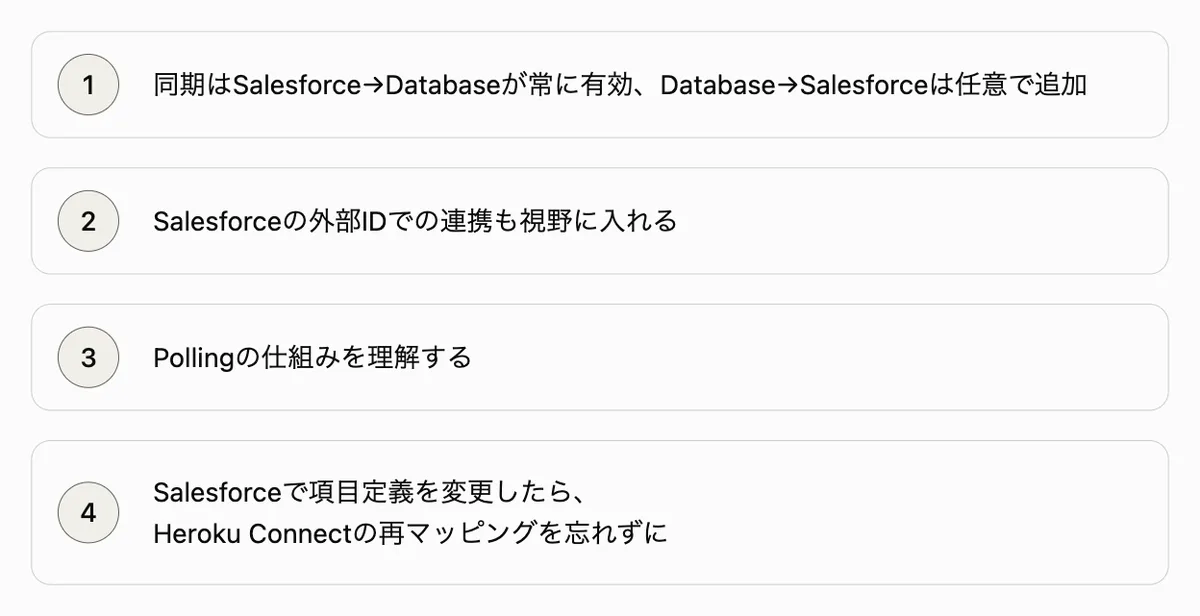
Heroku Connect is an add-on for Heroku, a platform-as-a-service owned by Salesforce; it replicates Salesforce objects as tables in Heroku Postgres, and the whole setup is done in a web interface with no code. Configuration works in units called mappings[1]: you pick one Salesforce object, check the fields to sync, and a dedicated table such as salesforce.contact is created automatically, with the checked fields becoming columns. Sync from Salesforce to the database is always on and cannot be switched off, while database-to-Salesforce writes are optional and enabled with a 'Write database updates' checkbox. Turning on writes requires choosing a unique identifier (external ID): reads and writes are handled separately, so a record just inserted into Postgres that has not yet received an sfid[2] can be duplicated if a read-side poll runs at the same moment.
There is no database-to-Salesforce-only mode: the only choices are read-only or read-write, and the closest approximation is extending the polling[3] interval for the Salesforce-to-database direction to its maximum of 60 minutes, which makes updates infrequent but does not eliminate them. Heroku Connect does not receive changes in real time; it asks Salesforce at a set interval whether anything has changed — 10 minutes by default, adjustable from 2 to 60 minutes on paid plans, while the free Demo plan used in the author's testing only goes down to 10 minutes. An optional 'Use accelerated polling' setting adds extra polls triggered by Salesforce change notifications on a best-effort basis — if the notification does not arrive, the normal interval applies — and works only in the Salesforce-to-Heroku direction, while the write direction always polls on a fixed 2-minute interval that cannot be changed.
Field definition changes on the Salesforce side do not propagate automatically. In a test on the Contact object, changing a text field's length from 255 to 100 characters updated the mapping screen display while the actual Postgres column stayed at 255; the fix was to remap the field — uncheck its sync setting and save, then check it again and save — after which the column was recreated with the correct limit. Data type changes behave the same way, while picklists are always replicated as varchar[4]: their values propagate on their own within the polling interval, but changing only a display label (the API name stays the same) has no effect on the Heroku side.
Sources
-
JPZenn JA
Heroku Connectで実際にハマった設定をまとめてみた