agent-desktop: computer use for AI agents via the OS accessibility tree
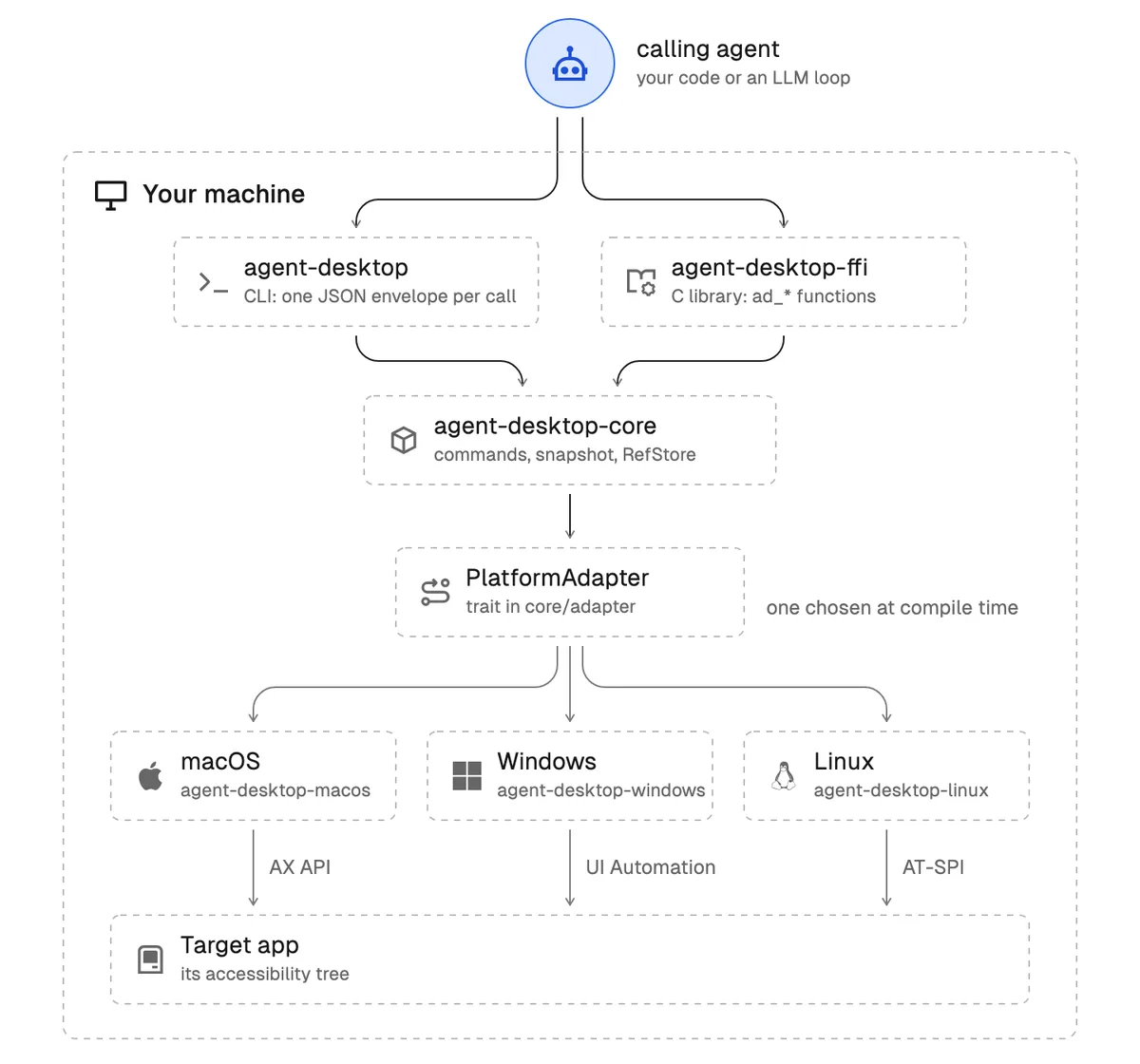
agent-desktop from vercel-labs, with 3792 stars today on GitHub Trending, gives AI agents computer use[1] on macOS, Windows, and Linux through the operating system's accessibility tree[2] instead of screenshots or pixel matching. It reads a desktop app's accessibility tree and returns it as JSON, attaching a ref[3] to every element the agent can act on. The agent clicks or types on a ref, takes a new snapshot to verify the result, and repeats; the loop lives in the agent, and agent-desktop contains no model. It ships as a CLI and a C library, libagent_desktop_ffi, for in-process calls; both run the same core, which reaches the OS only through a PlatformAdapter, and each binary is built for one OS.
Actions are headless[4] by default — no pointer movement, no focus change — with a --headed flag for physical input. If the UI has changed, an action returns STALE_REF or AMBIGUOUS_TARGET, and refs are tied to their snapshot id. The tool has 60 command names, 56 of them operational, covering observe, act-on-a-ref, keyboard and mouse, apps and windows, notifications, clipboard, wait, sessions, and system commands; the four exceptions (key-down, key-up, mouse-down, mouse-up) refuse to run until a daemon can release a held key or button.
Platform requirements are macOS 13 or later with the AX API, Windows 10 1809 or later with UI Automation, and Ubuntu 24.04 or later with X11 or Wayland and AT-SPI. The binary carries guides that match its version (skills get desktop and skills get platform), can be installed into an agent harness from skills.sh or referenced in AGENTS.md, and its warning states that snapshots, clipboard reads, screenshots, command output, and debug artifacts can contain private desktop content and should stay out of public logs and uploads.
Sources
-
GitHub Trending
vercel-labs/agent-desktop